New Dashboard Design
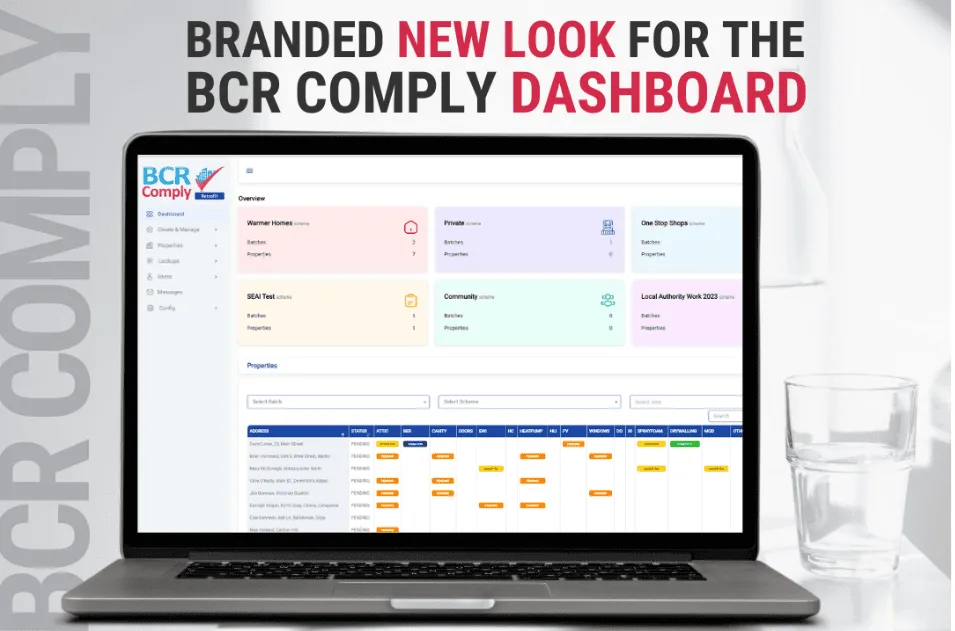
New year, new us! Exciting news from BCR Comply! As we step into 2024, we are thrilled to unveil a brand new look for our dashboard. We've been working on a design that is more beautiful, more professional, and ultra-useful for you. Innovation never stops, and neither do we. The upgraded dashboard is geared to elevate your experience in the retrofit, construction, and solar industries.
Stay tuned for a more efficient workflow in the year ahead with us!
1. Schemes and batches creation
A Scheme is a particular set of properties that you manage together more efficiently and has a particular name, for example: One Stop Shops scheme, Warmer Homes scheme, Private scheme, SEAI Test scheme, Community scheme, Local Authority Work 2023 scheme, and so on.
When your Scheme is created, you need to create a Batch. Batches are subsets of properties that must be allocated to a particular Scheme.
2. Property creation
The Properties can be viewed via various routes on the Dashboard. You can filter them by a Scheme or by a Batch and get an overview on the main page of the dashboard.
3. Scheduler: your efficient way to plan all your properties
Get the whole list of your properties, measures and start and end dates.
4. Carry out your inspections and get PDF reports as the result
Go to the app and fill in all the necessary forms for your property. Once submitted, you get the signed PDF file with the current date on it.
5. Assign measures to a property
Via the Dashboard you can easily assign a Measure to a property. Once you assign a measure, it is shown on the main app for the user. These are the initial upgrade measures that you intend to carry out on the property.
6. Assign a contractor to a measure
Contractors can be internal operatives or outside contractors that carry out work on the properties. These contractors can access both their own Dashboard and the Lite App and only see the properties and information which is relevant to their role.
7. Upload required documentation
The Contractor is encouraged by the system to provide the required verification documents on completion of the measure, to verify that the measure has been carried out correctly.
8. Chat directly to a contractor via our messaging system
You can easily send a message directly within your Dashboard and App, ensuring your administrator and contractor (surveyor or HEA/BER assessor) stay connected.
9. Add reminders if needed
Easily add a Reminder to the contractor via your property if needed.
Don't hesitate to contact us if you have any queries by email or phone - we are always happy to help.